neo-agent
GitHub Copilot Setup Guide
How to get a GitHub Personal Access Token (PAT) for AI model access via Copilot.
What You Need
To use Neo with GitHub Copilot models (Claude, GPT-4, etc.), you need:
- GitHub Account with Copilot access
- Personal Access Token (PAT) — A secure key that lets Neo use Copilot on your behalf
Step-by-Step: Create a GitHub PAT
Step 1: Go to GitHub Settings
- Log in to github.com
- Click your profile picture (top right)
- Click Settings
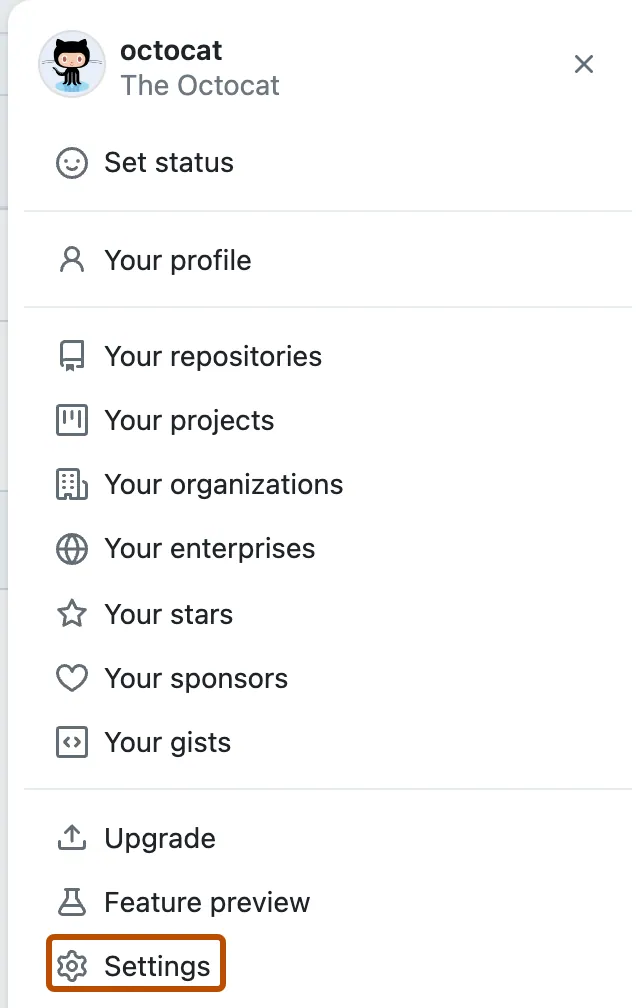
Step 2: Navigate to Developer Settings
- Scroll down the left sidebar
- Click Developer settings (at the very bottom)
Step 3: Create Personal Access Token
- Click Personal access tokens
- Click Tokens (classic) — NOT “Fine-grained tokens”
- Click Generate new token
- Click Generate new token (classic)
Step 4: Configure the Token
Note: Give it a descriptive name like “Neo Agent”
Expiration: Choose based on your preference:
- “No expiration” — Convenient but less secure
- “90 days” — Good balance
- “30 days” — More secure, requires rotation
Scopes: Check these boxes:
- ☑️
repo— Full control of repositories - ☑️
read:user— Read user profile data - ☑️
user:email— Read user email addresses
⚠️ Important: You only need these 3 scopes. Don’t check everything!
Step 5: Generate and Copy
- Click Generate token (green button at bottom)
- COPY THE TOKEN NOW — You won’t see it again!
- The token starts with
ghp_orgho_
Step 6: Store Safely
Save the token somewhere secure:
- Password manager (1Password, Bitwarden, etc.)
- Encrypted notes
- NOT in plain text files or emails
Verify Copilot Access
Your GitHub account must have Copilot enabled:
For Individual Users
- Go to github.com/settings/copilot
- If you see “GitHub Copilot is active”, you’re good!
- If not, you may need to sign up for Copilot ($10/month or free for students/open source)
For Organization/Enterprise Users
- Your organization admin enables Copilot
- Check with your IT team if you’re not sure
Troubleshooting
“Token doesn’t work”
- Make sure you copied the full token (starts with
ghp_orgho_) - Check the token hasn’t expired
- Verify the scopes are correct (repo, read:user, user:email)
“Copilot not available”
- Verify Copilot is enabled at github.com/settings/copilot
- If using organization account, check with your admin
“Rate limited”
- You may have hit GitHub’s rate limits
- Wait a few minutes and try again
- Consider upgrading to Copilot Enterprise for higher limits
Security Best Practices
- Use minimal scopes — Only
repo,read:user,user:email - Set expiration — 90 days is a good balance
- Don’t share tokens — Each person should have their own
- Rotate regularly — Generate new tokens periodically
- Revoke if compromised — Go to Settings → Developer settings → Personal access tokens → Delete
Alternative: Use OpenAI/Anthropic Directly
If you don’t have GitHub Copilot, you can use AI models directly:
OpenAI
- Go to platform.openai.com
- Sign up / Log in
- Go to API Keys
- Create new secret key
- Copy the key (starts with
sk-)
Anthropic
- Go to console.anthropic.com
- Sign up / Log in
- Go to API Keys
- Create key
- Copy the key (starts with
sk-ant-)
Ready to Set Up Neo?
Once you have your token:
- Go to Neo Setup Wizard (link TBD)
- Paste your GitHub PAT
- Choose your communication channel (Telegram/Discord)
- Your agent will be ready in ~2 minutes!
Questions? Contact support@themenonlab.com